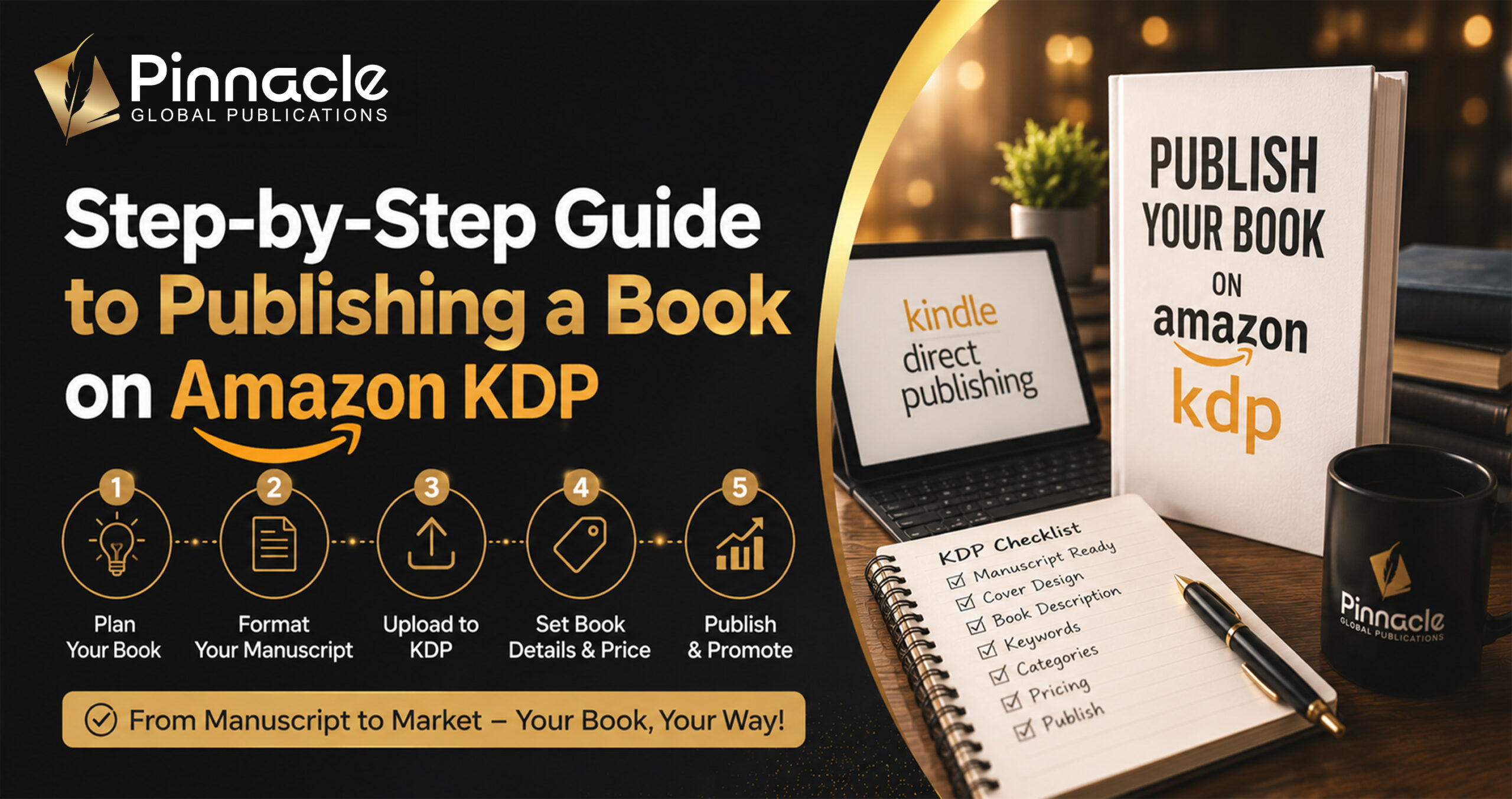
Publishing a book was once considered a long journey that required approval from literary agents, acceptance by publishing houses, and months, sometimes years, of waiting before a book ever reached readers. For many aspiring authors, this process felt discouraging and out of reach.
Today, this has completely changed.
With platforms like Amazon Kindle Direct Publishing (KDP), authors now have the ability to publish their work independently, without relying on traditional gatekeepers. This shift has opened the door for writers around the world to share their stories, knowledge, and ideas directly with readers. With just a few steps, your manuscript can be transformed into a published book available to millions of readers globally.
However, while the process may appear simple at first glance, successful amazon kindle book publishing requires careful planning and attention to detail. Publishing is not just about uploading a file. It involves preparing your manuscript, ensuring professional editing, formatting your book correctly, designing a compelling cover, optimizing your book listing, and implementing effective marketing strategies.
Each of these stages plays a crucial role in determining how your book performs in the marketplace.
This comprehensive Amazon KDP publishing guide is designed to walk you through every step of the journey. Whether you are a beginner asking, how do I publish a book on Kindle, or an experienced author looking to refine your publishing approach, this guide will provide clarity and direction so you can publish your book with confidence and purpose.
What Is Amazon Kindle Direct Publishing (KDP)?
Amazon Kindle Direct Publishing, commonly known as KDP, is a self-publishing platform that allows authors to publish both eBooks and paperback books directly on Amazon. It removes the traditional barriers to entry and gives writers full control over the publishing process.
Instead of submitting manuscripts to publishers and waiting for approval, authors can now upload their work, set pricing, and make their books available for sale in a matter of days.
Through amazon kindle books publishing, authors gain access to a wide range of powerful tools and opportunities, including:
- The ability to publish books quickly and efficiently
- Royalty options of up to 70% on eligible sales
- Access to Amazon’s global marketplace
- The flexibility to update book content even after publishing
- Full ownership and control over their intellectual property
This level of independence has completely transformed the publishing industry. As a result, publishing books on amazon kindle has become one of the most popular and accessible options for both new and experienced authors.
KDP also supports both digital and print formats, allowing authors to offer their books as Kindle eBooks and print-on-demand paperbacks without needing to manage inventory or printing logistics.
Why Authors Choose Kindle Publishing
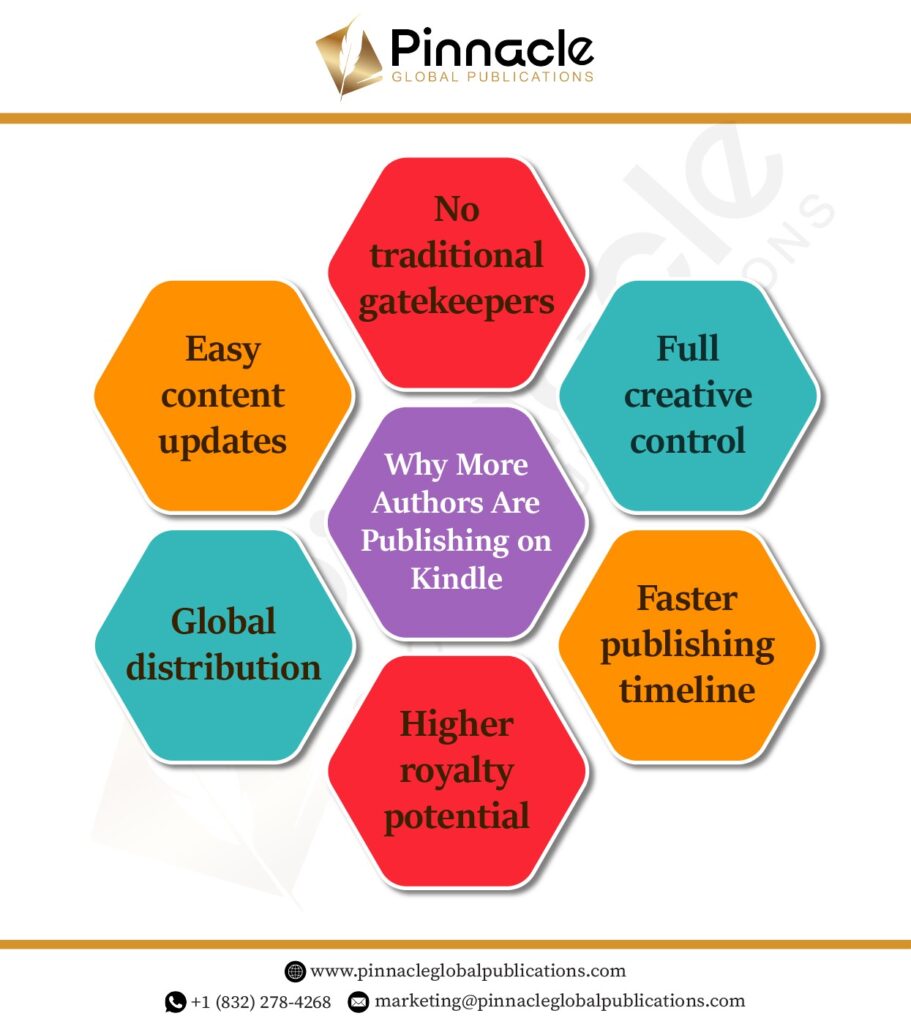
Understanding why so many authors choose Kindle publishing helps you recognize its value and potential. The platform offers several advantages that make it an attractive option for writers at all stages of their journey.
Full Creative Control
One of the biggest benefits of kindle book publishing is complete creative freedom.
Unlike traditional publishing, where decisions are often made by editors and publishers, KDP allows authors to maintain control over every aspect of their book. This includes:
- The content and final manuscript
- Cover design and visual branding
- Pricing strategy
- Marketing approach
- Distribution choices
This level of control ensures that your vision as an author remains intact from start to finish.
Faster Publishing Timeline
Traditional publishing can take a long time, often involving multiple rounds of submissions, revisions, and approvals. In contrast, KDP allows authors to publish their books quickly.
Once your manuscript is ready and uploaded, your book can go live on Amazon within 24 to 72 hours. This speed allows authors to respond to trends, release content faster, and maintain momentum in their writing careers.
Global Distribution
Another major advantage of publishing books on amazon kindle is the ability to reach a worldwide audience.
Amazon operates in multiple countries, meaning your book can be available to readers across different regions without requiring separate distribution agreements. This global reach is especially valuable for authors who want to expand their readership beyond local markets.
Higher Royalties
Compared to traditional publishing, KDP offers significantly higher royalty rates.
Authors can earn up to 70% royalties on eligible eBook sales, depending on pricing and distribution choices. This allows writers to retain a larger share of their earnings and build a more sustainable income from their work.
Flexibility and Control Over Updates
Another benefit often overlooked is the ability to make updates even after your book is published.
Authors can:
- Revise content
- Update covers
- Adjust pricing
- Improve descriptions
This flexibility ensures that your book can evolve over time, something that is rarely possible in traditional publishing.
Step-by-Step Amazon KDP Publishing Guide
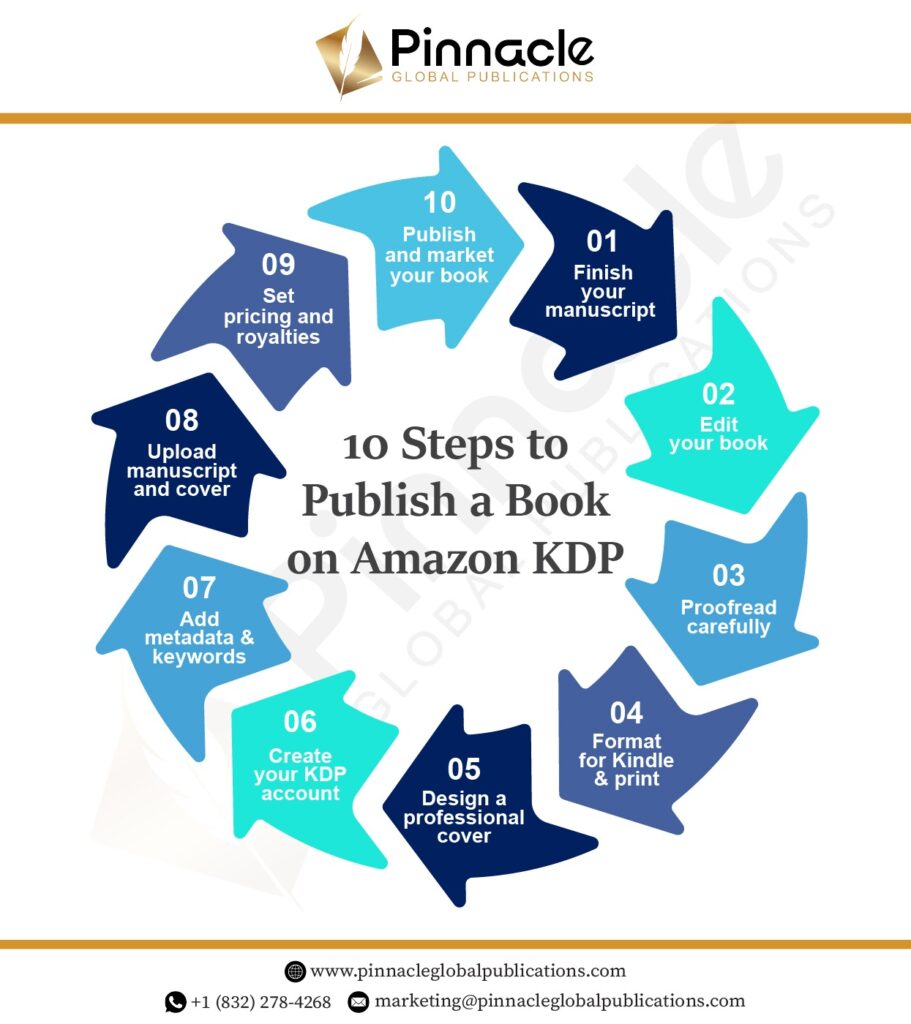
Now that you understand the basics of Kindle publishing, let’s walk through the complete process step by step. This section of the Amazon KDP publishing guide explains exactly how to publish your book from start to finish.
Whether you’re wondering how do I publish a book on Kindle or looking to improve your existing publishing strategy, these steps will guide you through publishing books on Amazon Kindle the right way.
Step 1: Finish and Polish Your Manuscript
Before you even think about uploading your book, your manuscript must be complete and fully refined.
This is the foundation of your entire publishing journey. No amount of marketing or promotion can fix a poorly written or unfinished manuscript.
What This Step Includes:
- Completing all chapters and sections
- Reviewing the structure and organization of your content
- Ensuring clarity, readability, and logical flow
- Identifying and understanding your target audience
- Refining your message or storyline
Many authors rush this stage because they are eager to publish. However, this is one of the most critical parts of amazon kindle book publishing.
A well-prepared manuscript leads to:
- Better reader engagement
- Positive reviews
- Higher retention rates
On the other hand, a weak manuscript often results in negative feedback, which can significantly affect your book’s performance on Amazon.
Take your time here. The stronger your manuscript, the smoother the rest of the process will be.
Step 2: Professional Editing
Editing is one of the most important steps in kindle book publishing, yet it is often overlooked by new authors.
Even experienced writers need editors. Editing ensures your book is clear, polished, and ready for readers.
Types of Editing
Developmental Editing
This focuses on the overall structure of your book.
It includes:
- Improving content organization
- Strengthening arguments or storylines
- Enhancing pacing and flow
- Ensuring consistency throughout the manuscript
For nonfiction, this ensures clarity of ideas. For fiction, it focuses on character development and storytelling.
Line Editing
Line editing focuses on how your sentences are written.
It improves:
- Sentence clarity
- Word choice
- Tone and style
- Readability
This step ensures your writing flows naturally and is easy to understand.
Copyediting
Copyediting focuses on technical accuracy.
It includes:
- Correcting grammar
- Fixing punctuation
- Eliminating spelling errors
- Ensuring consistency in formatting and style
Skipping editing is one of the biggest mistakes authors make when learning how to publish a Kindle book. A professionally edited book not only improves readability but also builds trust with your audience.
Step 3: Proofreading
Proofreading is the final step before your book is ready for publishing.
Even after editing, small errors can remain. Proofreading ensures your manuscript is clean and polished.
It Includes:
- Fixing typographical errors
- Correcting punctuation mistakes
- Checking formatting consistency
- Eliminating minor grammatical issues
This stage may seem small, but it has a big impact.
Even minor errors can:
- Distract readers
- Reduce credibility
- Lead to negative reviews
For authors learning how do you publish a book on Kindle, proofreading is the last quality check before going live.
Step 4: Formatting Your Book for Kindle
Formatting is what makes your book look professional across all devices.
A well-formatted book improves readability and ensures compatibility with Amazon’s system.
Kindle Formatting Requirements
When preparing your book for amazon kindle book publishing, you must ensure:
- Proper paragraph spacing
- Consistent font style and size
- Clickable table of contents
- Clear chapter breaks
- Proper alignment and margins
Following official kindle book publishing guidelines is essential to avoid formatting issues that can affect your book’s appearance.
Kindle Direct Publishing Book Sizes (For Print)
If you are publishing a paperback version, formatting becomes even more important.
Amazon requires specific trim sizes for print books.
Common kindle direct publishing book sizes include:
- 5” x 8”
- 6” x 9”
- 8.5” x 11”
Choosing the right size depends on your book type and genre.
Proper formatting ensures:
- Your book prints correctly
- Pages align properly
- The reading experience feels professional
Many authors use formatting tools or professional services to avoid errors during this stage.
Step 5: Designing a Professional Book Cover
Your book cover is your most powerful marketing tool.
Before readers ever read your description, they see your cover. This first impression can determine whether they click on your book or scroll past it.
A Strong Cover Should:
- Match your genre and audience expectations
- Be visually appealing and clean
- Use readable typography
- Look clear even in thumbnail size
In amazon kindle books publishing, most readers discover books through search results. Your cover must stand out in a crowded marketplace.
A professional cover increases:
- Click-through rates
- Reader interest
- Sales potential
Never underestimate the importance of design in publishing books on Amazon Kindle.
Step 6: Create Your KDP Account
Before you can publish, you need to set up your Amazon KDP account.
This is done through the kindle book publishing login portal.
Steps to Create an Amazon KDP Account
- Visit the Amazon KDP website
- Sign in using your Amazon account
- Complete your author and publisher details
- Add payment and tax information
Once your account is set up, you are ready to begin publishing.
This is your central dashboard for:
- Uploading books
- Tracking sales
- Managing royalties
- Updating content
Step 7: Add Book Details (Metadata Optimization)
Metadata plays a major role in how your book is discovered on Amazon.
When learning how to publish a book on Kindle, this step is often underestimated, but it is crucial for visibility.
Key Metadata Elements
- Book title and subtitle
- Author name
- Book description
- Keywords
- Categories
Your keywords should include relevant search phrases such as:
- how to publish a Kindle book
- publish Kindle book
- amazon kindle books publishing
- how do I publish a book on Kindle
Optimized metadata helps your book:
- Rank higher in search results
- Reach the right audience
- Improve discoverability
Think of metadata as your book’s digital identity.
Step 8: Upload Your Book Files
Now it’s time to upload your book.
This step includes:
- Uploading your formatted manuscript
- Uploading your cover file
- Using the preview tool to check formatting
Always preview your book carefully.
Check for:
- Formatting errors
- Missing pages
- Alignment issues
- Broken links in the table of contents
This step ensures your book looks exactly how you want before it goes live.
Step 9: Pricing and Royalties
Amazon offers two main royalty options:
35% Royalty
- Available in all regions
- Fewer restrictions
70% Royalty
- Available in selected countries
- Requires pricing within a specific range
When deciding your price, consider:
- Your genre
- Competitor pricing
- Book length
- Target audience
Pricing affects both your sales and earnings, so choose a strategy that balances visibility and profitability.
Step 10: Publish Your Book
This is the final step.
Once everything is ready:
- Click “Publish”
- Amazon reviews your book
- Your book goes live within 24–72 hours
Congratulations, you’ve successfully completed how to publish a book on Amazon Kindle Direct Publishing.
Your book is now available to readers worldwide.
Kindle Publishing Options
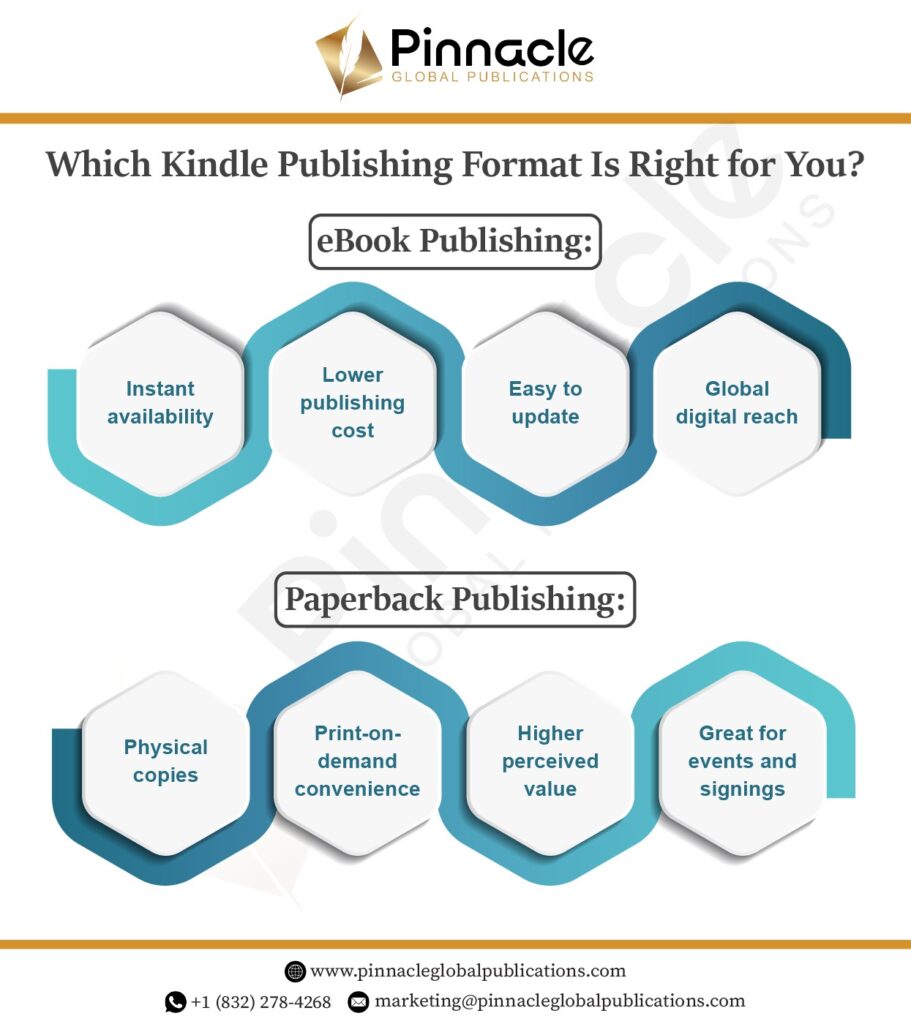
When following this Amazon KDP publishing guide, one of the most important decisions you’ll make is how you want your book to be published.
Amazon Kindle Direct Publishing offers two primary formats: eBook publishing and paperback publishing. While both options allow you to reach readers worldwide, they serve different purposes and audiences. Understanding how each works will help you choose the right approach for your book and your goals.
Let’s take a closer look at both options in a simple and practical way.
eBook Publishing
eBooks are the most widely used format in amazon kindle book publishing, especially for new authors entering the self-publishing space.
They are popular because they are fast to publish, easy to distribute, and cost-effective. If you’re just starting out and learning how to publish a Kindle book, eBooks are often the easiest entry point.
Why eBooks Work So Well
One of the biggest advantages of eBooks is speed. Once your book is uploaded and approved by Amazon, it can go live within a short time. There is no printing process involved, which means readers can access your book almost instantly from anywhere in the world.
Another major benefit is affordability. Since there are no printing or shipping costs, authors don’t need a large budget to get started. This makes eBooks an excellent choice for first-time authors who want to publish without taking on financial risk.
Flexibility is another key advantage. With kindle book publishing, you can update your book even after it’s published. Whether you need to fix errors, improve content, or make small changes, you can do so without having to relaunch your book entirely.
eBooks also offer global reach. Readers from different countries can download your book instantly, which helps expand your audience beyond local markets. This is one of the reasons why publishing books on Amazon Kindle has become so popular worldwide.
Because of all these benefits, many authors choose to begin their journey with eBooks before exploring other formats.
Paperback Publishing
While digital books are convenient, paperback books continue to hold strong appeal among readers.
Many people still prefer the experience of reading a physical book. Paperback publishing allows you to offer that experience without the complexity of traditional printing.
Why Paperback Publishing Still Matters
One of the biggest advantages of paperback books is tangibility. Readers can hold the book, flip through pages, and enjoy a more traditional reading experience. This is especially important for genres like memoirs, educational books, or gift items.
Amazon’s print-on-demand system makes this process simple. Your book is only printed when someone places an order. This means you don’t have to worry about storing inventory or investing in bulk printing.
Paperback books also carry a higher perceived value. They often feel more professional and credible, which can influence buying decisions. This makes them especially useful for:
- Author events and book signings
- Library placements
- Retail bookstore opportunities
- Gift purchases
Additionally, paperback publishing allows you to reach readers who may not prefer digital formats. By offering a physical version, you expand your potential audience and increase your chances of making more sales.
Choosing the Right Approach
Now the question is: should you choose eBook or paperback?
The answer for many authors is simple… both.
Instead of limiting your book to one format, a hybrid approach allows you to reach a wider audience. Some readers prefer digital convenience, while others enjoy physical books.
By offering both formats, you can:
- Increase your visibility across different platforms
- Reach more types of readers
- Maximize your overall sales potential
If your goal is to publish your book on Kindle effectively, using both eBook and paperback formats is often the smartest long-term strategy.
Common Mistakes to Avoid
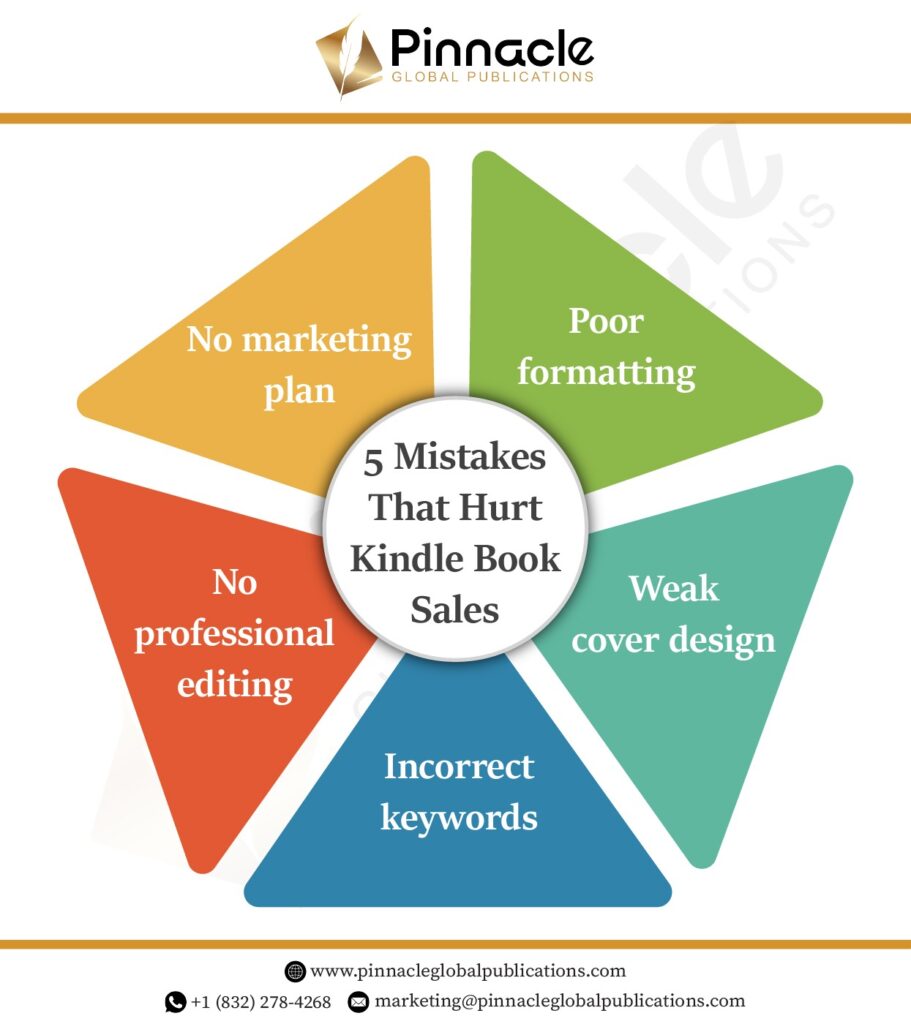
Even though publishing books on Amazon Kindle is easier than ever, many authors struggle because of simple but costly mistakes.
Understanding these issues early can save you time, improve your book quality, and increase your chances of success.
Poor Formatting
Formatting is one of the most overlooked aspects of publishing.
When a book is not formatted properly, it becomes difficult to read and looks unprofessional. Readers may quickly lose interest if they encounter issues like uneven spacing, broken paragraphs, or inconsistent layouts.
Common formatting problems include:
- Inconsistent spacing between paragraphs
- Misaligned text or margins
- Missing or broken chapters
- No table of contents
Following proper kindle book publishing guidelines ensures your book looks clean, organized, and easy to read. A well-formatted book creates a better reading experience and reflects professionalism.
Weak Cover Design
Your book cover is your first impression, especially in online marketplaces.
Readers often decide within seconds whether to click on a book based on its cover. If your cover looks unprofessional or doesn’t match your genre, it can immediately reduce your chances of getting attention.
A weak cover can:
- Lower your click-through rate
- Make your book appear amateur
- Push potential readers toward competing titles
Investing in a strong, visually appealing cover is essential for success in amazon kindle books publishing. A good cover communicates your book’s tone, genre, and quality at a glance.
Incorrect Keywords
Keywords play a major role in how readers find your book on Amazon.
If your keywords are not relevant or optimized, your book may not appear in search results. Even if your content is excellent, poor keyword selection can limit your visibility.
Using targeted phrases such as:
- publish Kindle book
- how to publish a book on Kindle
- kindle direct publishing books
can help your book reach the right audience.
Think of keywords as the bridge between your book and your readers. Without the right keywords, that connection becomes weak.
No Editing
Skipping editing is one of the most common and damaging mistakes in kindle self published books.
Even a great story or idea can lose its impact if the writing is unclear or full of errors. Readers expect a certain level of quality, and anything less can lead to negative reviews.
Unedited books often:
- Contain grammar and spelling mistakes
- Lack clarity and flow
- Feel unpolished and difficult to read
Editing is not optional. It is essential. It directly affects how readers perceive your book and whether they recommend it to others.
No Marketing Plan
Many authors believe that once their book is published, readers will automatically find it.
Unfortunately, this is rarely the case.
Publishing is only the first step. Without a clear marketing plan, your book may struggle to gain visibility, no matter how good it is.
Without marketing:
- Your book may not reach your target audience
- Sales may remain low
- Growth becomes slow and inconsistent
A successful publishing journey includes both production and promotion. Planning your marketing strategy early can make a significant difference in your book’s performance.
How to Market Your Kindle Book
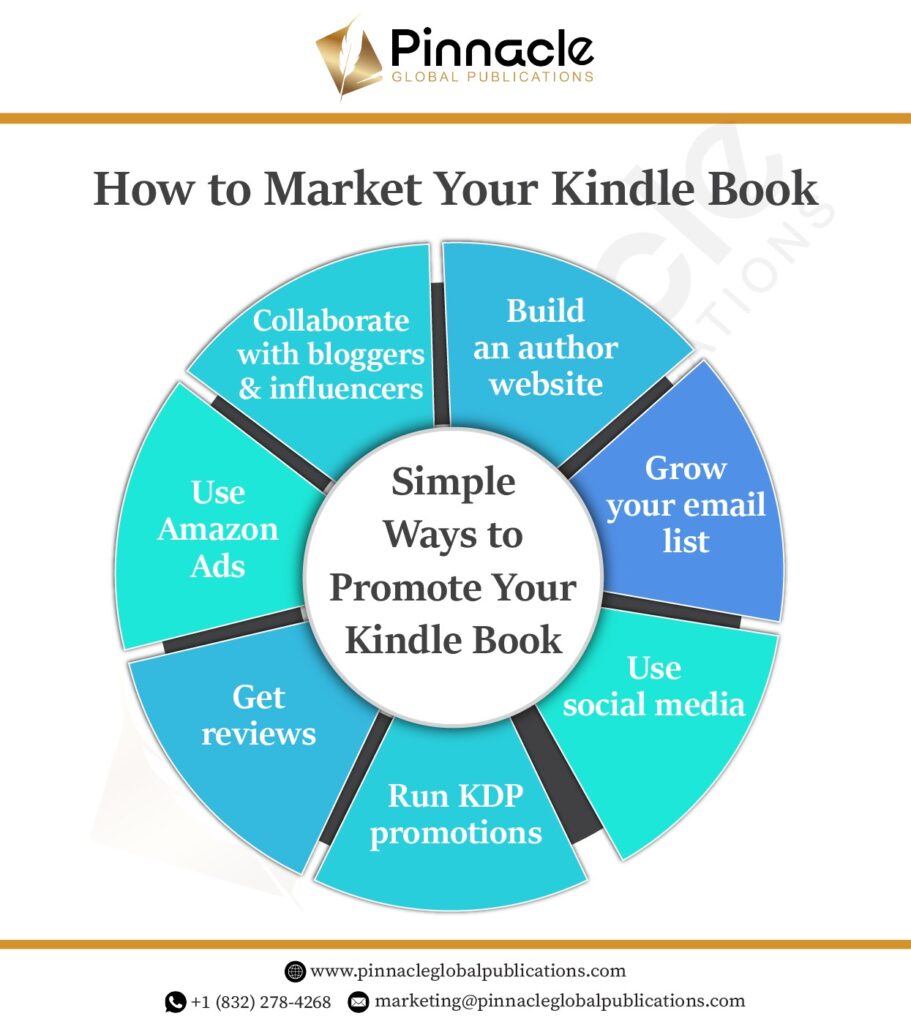
Publishing your book is a major achievement, but it’s only the beginning of your journey as an author.
Many writers assume that once their book is live on Amazon, readers will automatically discover it. In reality, even the best books need visibility to succeed. This is where marketing becomes essential.
If you’re asking, how can I market my newly published free Kindle book, the answer lies in building awareness, connecting with readers, and consistently promoting your work.
Let’s break down the most effective strategies in a simple and practical way.
Build an Author Platform
Before you focus on selling your book, you need to establish your presence as an author.
An author platform is your online identity. It helps readers find you, learn about your work, and stay connected with you over time. Without a platform, it becomes much harder to build a loyal audience.
What Your Author Platform Should Include
Website
A professional website acts as your central hub. It’s where readers can discover your books, learn about you, and access important updates. Even a simple website adds credibility and makes you look more established.
Email List
An email list is one of the most powerful tools for authors. It allows you to communicate directly with your readers without relying on social media algorithms. You can use it to share updates, promotions, and future book releases.
Social Media
Social media helps you engage with your audience and grow your visibility. You don’t need to be active everywhere. Focus on one or two platforms where your target readers spend time, and build your presence consistently.
Creating a strong platform is a long-term strategy that supports not just one book, but your entire writing career.
Use KDP Promotions
Amazon provides built-in promotional tools that can help your book gain traction, especially in the early stages.
If you’re trying to understand how to publish a Kindle book successfully, learning how to use these tools is essential.
Promotion Options You Can Use
Free Promotions
Offering your book for free for a limited time can increase downloads and attract new readers. This is particularly useful for building early visibility.
Discounted Pricing
Lowering your price temporarily can encourage more people to take a chance on your book, especially if you’re a new author.
These promotions can help your book:
- Climb Amazon rankings
- Reach more readers
- Generate initial momentum
Many authors use this approach when figuring out how can I market my newly published free Kindle book effectively.
Get Reviews
Reviews are one of the most important factors in your book’s success.
When potential readers see positive reviews, they are more likely to trust your book and make a purchase. Reviews also play a role in Amazon’s algorithm, helping your book appear more often in search results.
How to Get Reviews
- Ask early readers for honest feedback
- Share your book with friends or your network
- Reach out to book reviewers and bloggers
- Offer advance copies in exchange for reviews
Even a small number of genuine reviews can make a big difference. Over time, as your book gains more feedback, your credibility grows.
Run Ads
If you want to increase visibility quickly, running ads is a powerful option.
Amazon Ads allow your book to appear directly in front of readers who are already searching for similar books. This targeted approach makes advertising more effective compared to general marketing.
Why Ads Work
- They increase your book’s exposure
- They help you reach the right audience
- They improve your chances of getting clicks and sales
While ads require some investment, they can be very effective when used strategically as part of your amazon kindle book publishing journey.
Collaborate With Others
You don’t have to promote your book alone.
Collaborating with others can help you reach new audiences and grow faster.
Ways to Collaborate
- Partner with influencers who talk about books
- Connect with bloggers who review similar genres
- Work with book reviewers to gain exposure
- Join writing communities and author groups
These collaborations introduce your book to readers who may not have discovered it otherwise. Over time, these connections can become a valuable part of your marketing strategy.
Work With Pinnacle Global Publications
Publishing a book on Amazon KDP is an exciting journey, but it requires careful planning and execution.
Pinnacle Global Publications offers expert support for authors looking to succeed in amazon kindle book publishing. Our team helps with editing, formatting, design, and publishing setup.
We also provide keyword optimization, marketing strategies, and professional guidance to help your book stand out.
Whether you’re learning how do you publish a book on kindle or need complete kindle book publishing services, we are here to help.
Reach out today and take the next step toward becoming a published author.
FAQs
Amazon Kindle Direct Publishing, or KDP, is Amazon’s self-publishing platform that allows authors to publish eBooks and paperback books directly on Amazon. It gives writers control over their content, cover, pricing, royalties, and publishing timeline. Instead of waiting for traditional publisher approval, authors can upload their book files, complete their book details, and publish independently.
To publish a book on Kindle for the first time, you need to complete your manuscript, edit and proofread it, format it according to Kindle requirements, create a professional cover, open a KDP account, add your metadata, upload your files, set pricing, and submit your book for review. Once Amazon approves it, your book goes live on the platform.
Yes, Amazon KDP is free to use. You do not pay Amazon to upload or publish your eBook or paperback. Amazon only takes a percentage of each sale depending on your selected royalty option. However, authors may still choose to invest in editing, formatting, cover design, and marketing to improve book quality and sales potential.
In most cases, your book can go live within 24 to 72 hours after submission. However, this does not include the time needed to write, edit, format, and prepare your book. The full publishing process can take anywhere from a few weeks to several months depending on your manuscript’s condition and how much professional help you need.
Yes, Amazon KDP allows authors to publish both eBook and paperback editions of the same book. Many authors do this to reach more readers. Some people prefer digital books for convenience, while others still enjoy reading physical copies. Offering both versions often improves visibility and sales opportunities.
Amazon KDP accepts several file types, including DOC, DOCX, EPUB, and PDF in some cases. EPUB is often preferred for eBooks because it supports flexible formatting. For paperbacks, print-ready PDF files are commonly used. Your file must meet Kindle publishing guidelines to display correctly across devices and print formats.
For eBooks, Amazon can assign a free ASIN, which works as the identifier on its platform. For paperbacks, you may use a free ISBN from Amazon or provide your own. If you want more control over your publishing identity and broader distribution outside Amazon, many authors choose to buy their own ISBN.
Some of the most common Kindle Direct Publishing book sizes for paperback editions include 5” x 8”, 5.5” x 8.5”, 6” x 9”, and 8.5” x 11”. The right size depends on your genre, audience, and formatting needs. For example, novels often use 5” x 8” or 6” x 9”, while workbooks or manuals may use larger sizes.
Authors can earn either 35% or 70% royalties on eBooks, depending on pricing and territory. Paperback royalties are calculated differently and include printing costs. Your actual earnings depend on book price, royalty option, genre competition, and sales volume. Authors who optimize their listings and market consistently often have better earning potential.
